Guide

Complete your workspace setup

Use onboarding to configure the essentials that unblock your team's first live workflow in claimOS without wandering through scattered settings pages or launching half-finished defaults.

Getting StartedAdminsUpdated Mar 12, 2026Step-by-step

Outcome

What this helps you do

Move from activation to a workspace that feels branded, controlled, and ready for the first real claim your team needs to work without confusing operators on day one.

This guide is written for admins and uses real claimOS screenshots so the instructions map cleanly to the product surface.

Prerequisites

Before you start

  • Owner or admin access to the workspace.
  • A clear idea of your team’s first live workflow.
  • Basic branding assets or naming decisions for the workspace.
  • One operator or demo-safe test path available for launch validation.

Steps

How to do it

  1. 1Open onboarding before touching settings

    Use the onboarding surface as the source of truth for setup instead of jumping directly into scattered settings pages and hoping you covered the basics.

  2. 2Lock the workspace identity and baseline defaults first

    Start with workspace profile, branding basics, and the defaults that shape how the first claim, task, and operator experience will behave. These are the settings that determine whether the workspace feels controlled or improvised.

  3. 3Configure the first live claim path before optional polish

    Prioritize first claim creation, core queue behavior, and the handoff into active work before touching optional settings that do not change launch readiness.

  4. 4Connect the minimum supporting workflows your team will use immediately

    If communications, intake capture, or delivery workflows are part of day one, connect and verify only the pieces the team will actually depend on right away.

  5. 5Validate the operator handoff with a demo-safe test path

    Walk through the experience from onboarding into the first live claim and then into My Work or Claims so you know the next owner will not hit blank states or missing context.

    If you have to explain where to click next or what the queue means, the launch path is not ready yet. Fix the path before inviting the team.

  6. 6Confirm the first-use experience reflects the latest state

    After each major setup step, return to onboarding and make sure the checklist, home surface, and empty states all reflect the saved configuration instead of stale or confusing launch cues.

  7. 7Run a readiness check before handing the workspace to operators

    Your goal is not maximum configuration. Your goal is a team-ready baseline with clear defaults, a usable first claim path, and no hidden blockers for the person who will work the first live record.

Screenshots
See the workflow

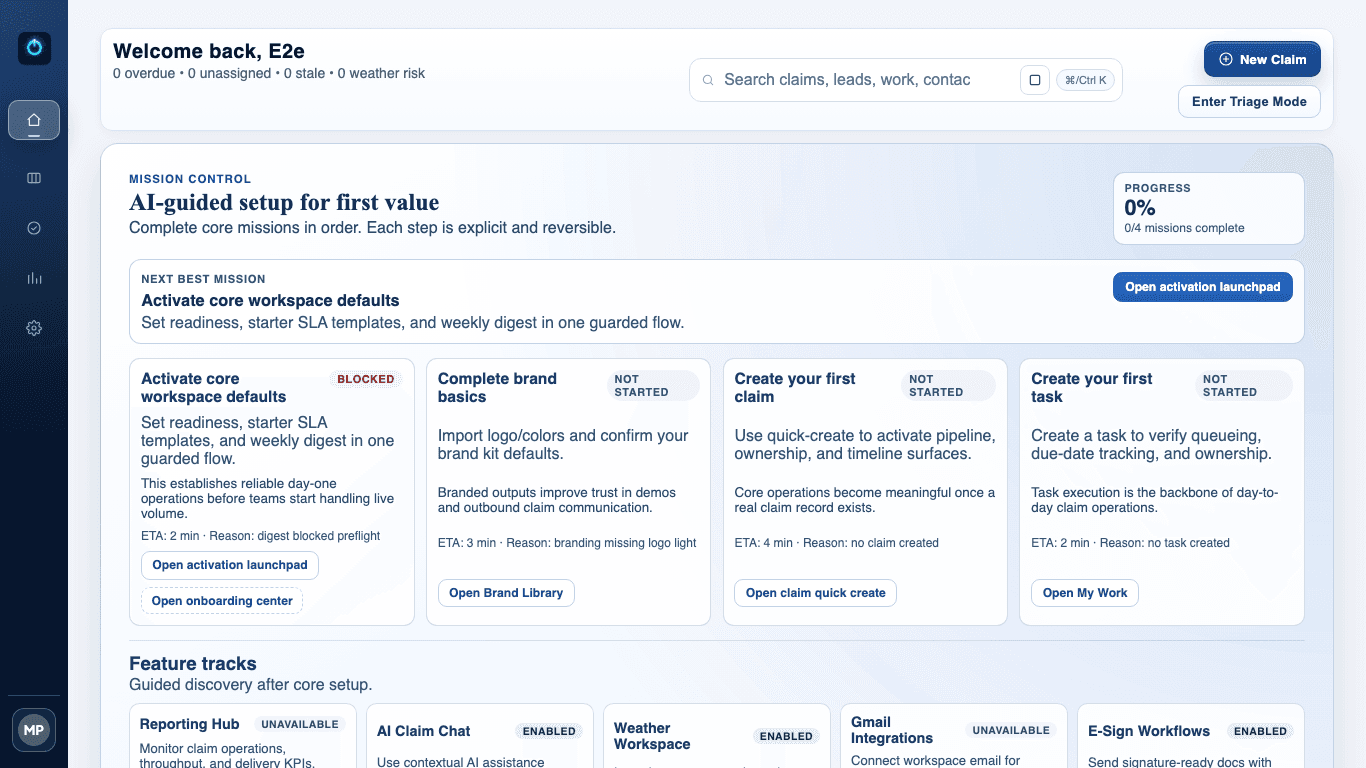
claimOS setup launchpad showing mission control, setup tasks, and at-a-glance readiness indicators.
This launchpad view is the clearest picture of day-one readiness. It shows what still blocks activation and what the workspace will expose once the essentials are complete.
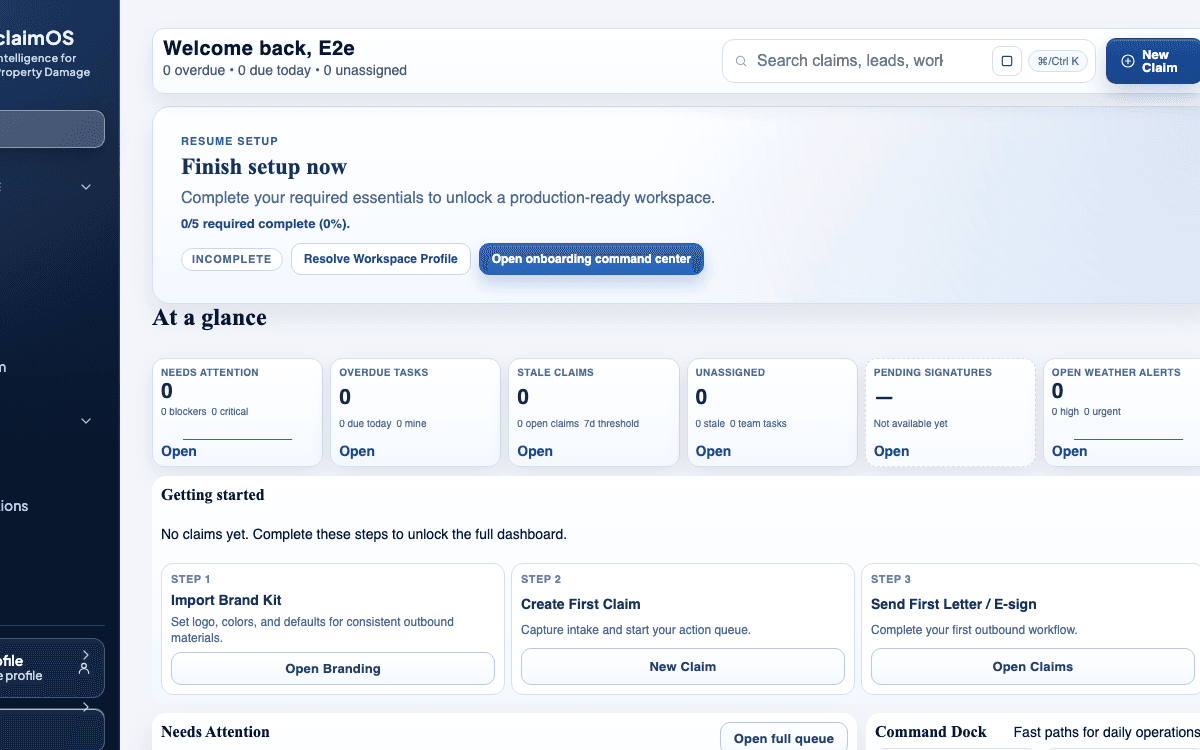
claimOS getting-started module highlighting the first setup actions and live readiness path on an empty workspace.
The empty-state module should always answer one question clearly: what does the team need to complete next before the workspace is trustworthy for live work?
claimOS first-fold dashboard view showing the workspace after the core setup path is complete.
After the essentials are done, the product should stop feeling like onboarding and start feeling like an operating system. This frame is the proof that launch moved into live readiness.
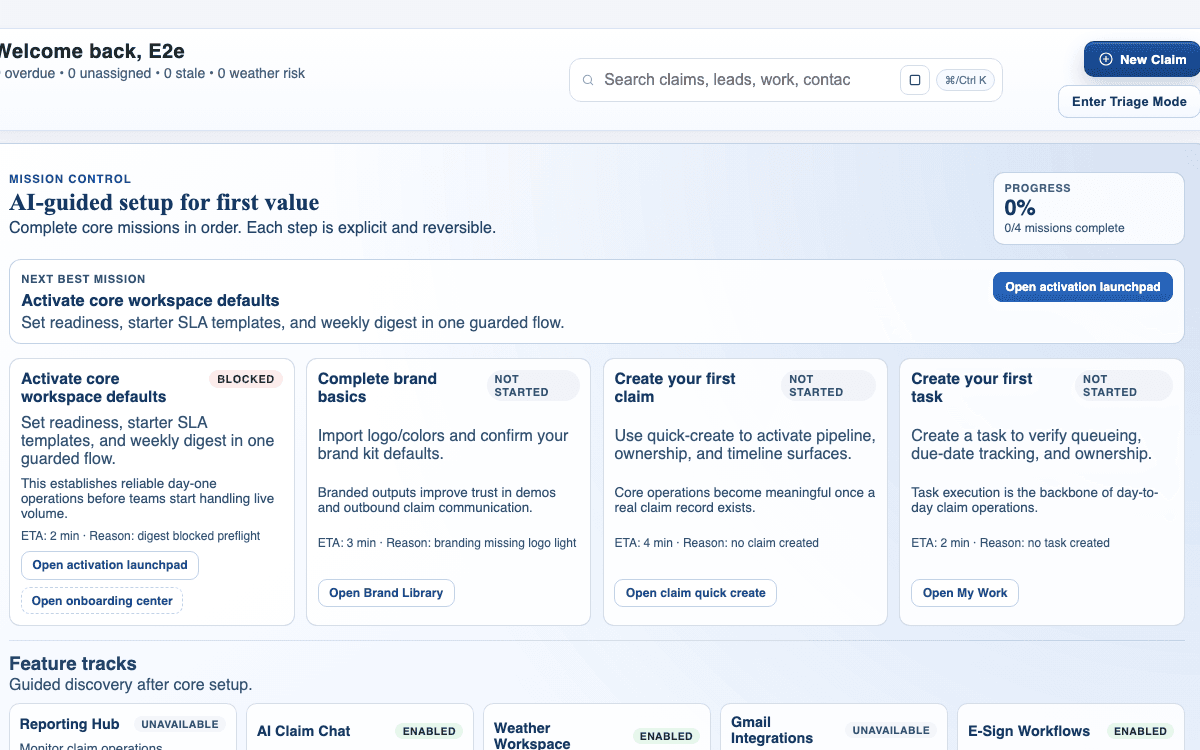
claimOS launch-ready overview showing active missions, feature tracks, and live-operating surfaces.
Use the final readiness view to validate that setup decisions now surface as stable launch cues instead of scattered admin settings.

Watch the paired walkthrough

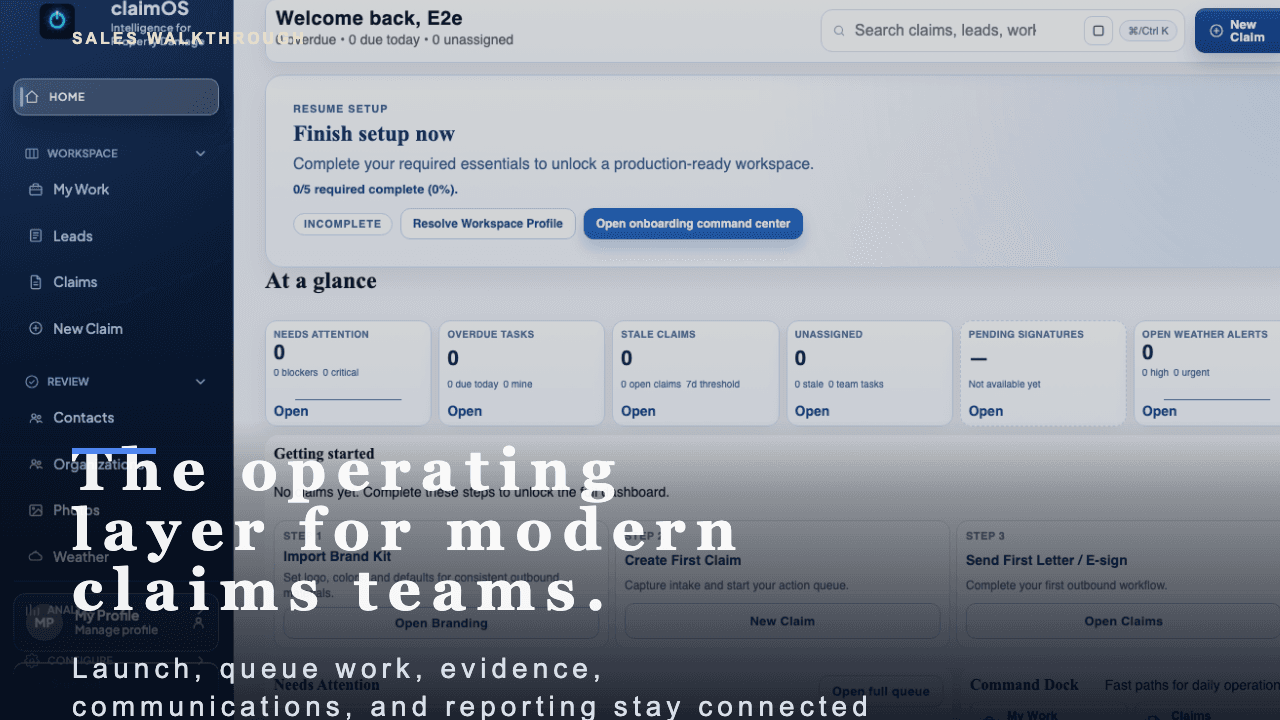
claimOS overview poster showing the shared operating surface, launch readiness, and live work modules in one frame.
Walkthrough0:56

See the same workflow in motion

A short buyer-facing walkthrough of how claimOS becomes the operating layer for launch, live claims work, evidence, communications, and reporting.

Start with the high-level buyer question: what does claimOS unify that most teams currently spread across multiple tools and private follow-up loops?

Watch related walkthrough

FAQ

Common questions

  • Do I need to finish every onboarding task before creating work?

    No. Start with the essentials that unblock your first claim, then return to optional configuration once the team has a working path.

  • Who should own setup in a new workspace?

    An owner or admin should handle the first-pass setup so defaults, permissions, and integrations stay consistent across the team.

  • What if the onboarding checklist does not look complete after I save a step?

    Return to the checklist, refresh the state, and confirm the blocking field or setting actually saved. Most launch friction comes from assuming a step is complete before the product reflects it.

  • When should I invite the broader team into a new workspace?

    Invite the broader team after the first claim path, basic defaults, and the daily work queue feel stable enough that operators will not hit dead ends on day one.

Keep Going

Related guides and walkthroughs

Guide

Create your first claim

Create your first live claim in claimOS so the team can move from setup into real execution without getting stuck in unnecessary data entry or unowned records.

Guide

Connect core integrations

Connect the external systems your team actually uses so claimOS can remain the operating layer instead of becoming another disconnected tool in the stack.

Guide

Read reporting and performance

Use reporting to understand throughput, bottlenecks, and operational health instead of relying on anecdotal activity or whoever spoke up most recently.

Video

claimOS overview

A short buyer-facing walkthrough of how claimOS becomes the operating layer for launch, live claims work, evidence, communications, and reporting.

Video

First claim walkthrough

A short buyer-facing walkthrough of how claimOS turns launch readiness into the first live claim without losing momentum, context, or team trust.